
New Features in 1.39.2#
I learned quite a bit of information on a BEFSR41 news site at http://www.hansenonline.net/Networking/LinksysNews.html by a Mr. Lars M. Hansen. The BEFSR41 is similar to the BEFW11S4 but without the wireless features. The description of the new features below is from this site. Thanks to Halfton on alt.internet.wireless for pointing this out. I originally mistook this information for BEFW11S4 info but it is not. The features are similar, but the firmware and firmware versions are not.
This was originally compiled for my BEFW11S4 page.
This sets the maximum packet size that can be sent over the router. The maximum value is 1492. A smaller MTU forces more packets to be sent. More packets means more acknowledgement messages, and more packet header information. So, setting a smaller MTU value basically increases network overhead. However, if you have a network with high packet losses, it might be better to have a lower MTU size. (Resending a lost smaller packet is not so bad as having to resend a larger one.)
You’ll want to make sure that your host has the same MTU size, or smaller. If you try to send a packet with a larger MTU size than the router supports, the router should respond with a ICMP ‘Fragmentation required – DF set’ message.1
This is bad, more network overhead, and your host is going to have to split up the packet anyway. A program that will let you tweak your PC network settings, such as MTU size is called DrTCP and can be found at DSLReports.com.
This router setting inforces the outgoing connection’s MTU. Incoming (server) connections are not affected by this setting.2
This is pretty slick (in my opinion). Basically, its standard port forwarding with a twist. When the router detects an outgoing connection on a specific port range, it will set up an incoming port forwarding rule (temporarily) on the ports you specify.
The BEFSR41 news site mentioned earlier has a good example of this involving SMTP. Another example is IRC. When you connect to an IRC server, often the IRC server connects back on 113 for an Ident lookup. However, often your router blocks these requests from getting back to your PC. If you were to set up a port trigger on ports 6000-7000 (a wide swath of ports, yes, but IRC servers usually are within this range) to forward the incoming port range 113-113, then the router will pass Ident requests.
Stateful Packet Inspection (SPI)
Basically this is a Good Thingâ„¢. However, according to our friends at the BEFSR41 news site, you cannot use SPI with port forwarding. Port triggering, however, still seems to work with SPI enabled! Hopefully port forwarding will too in future firmware revisions. Basically, if you set up the router for any servers you can’t use SPI.
SPI looks at each packet a little more in depth than just normal routing.3 It checks where the packet is going and where it is from and remembers this info for the future. If a packet comes to your door that has the right routing information, a normal NAT might just pass the packet on regardless. However, an SPI firewall might say, ‘Hey, wait a minute, this packet is from somewhere that I haven’t visited lately, its unsolicited, so I’m just going to ignore it.’
This has the effect of blocking unwanted bad stuff like trojan connection attempts and port scans. If a packet arrives that doesn’t match one of your outgoing connections, it is simply ignored.
Hidden Features in the 1.39.2 Firmware#
IMPORTANT! For reasons we can probably guess, these features have been intentonally hidden by the firmware coders. It stands to reason that they don’t work, or that they’re extremely buggy. I do not advocate trying these hidden features. If you opt to play with these features, you do so AT YOUR OWN RISK.
I’m going to assume you’re router is at 192.168.1.1 and has the default password of ‘admin’. If it does not, you’ll need to modify these links to get them to point to your router. Also, I’ve intentonally not made them real links because you really shouldn’t be trying this at home.
Enhanced Logging Functions (aka Diagnostic Logging)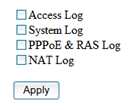
http://admin:[email protected]/LogManage.htm
Thanks to Glen for this: The extending logging exists in the BEFSR41 as well. You can easily access this feature by clicking the “Log” tab, then click around the top of the “Log” tab near the blue bar. I couldn’t find it at first because the mouse cursor didn’t change into the “finger” pointer for some reason.
As far as I can tell, you can check off which SNMP messages you’d like your router to send out. However, most logging clients for the BEFW11S4 don’t really know about these new logging functions.
SNMP Trap Watcher can receive all of the SNMP Messages that the router sends, apparently. I’ve also head that there are other SNMP Trap loggers that work.
Works Cited#
1 Brian R. Bertan’s usenet post Re: Windows, TCP, and a Compatible Router HELP!
2Bill_MI’s DSLR post MTU, PPPoE, Servers and LinkSys Routers